Best VPN for Mac (2026): App Store vs Direct-Download Builds Compared
The best VPN for Mac for most people is NordVPN, installed from its website rather than the App Store, because that build keeps the per-app kill switch and custom DNS that the App Store version drops. If you want open-source code or a free start, pick Proton VPN; if you want the most privacy for the least personal data, pick Mullvad, which pays us nothing.
That one detail, which build you install, is what most Mac roundups skip. Several providers now ship two different Mac apps, one through the Mac App Store and one as a direct download, and they are not always the same product. Everything below was read from each provider's own macOS pages on 9 October 2026; we have not run speed tests and quote none.
Skip this page if you only need a VPN for an iPhone. If you are on a work-managed Mac, check with your IT team before installing anything that adds a network extension.
The short list (and who each one is for)
Six VPNs earn a place on a Mac in 2026. Four of them pay us a commission if you buy; two, Mullvad and Windscribe, run no affiliate programme at all, and they are here on merit.
NordVPN: most features, if you pick the right build
NordVPN is our top Mac pick for its feature depth: NordLynx, an opt-in post-quantum mode, Meshnet, Real-time protection (formerly Threat Protection) and NordWhisper for restrictive networks. Both of its Mac builds need macOS 14 Sonoma or later. Install the website build if you want the per-app kill switch, full Real-time protection, full Meshnet and custom DNS. One account covers ten devices. It scores 90 on our Gauge Score, and our NordVPN review covers its audit record in detail.
Affiliate link. Check the current price on the provider’s own page — a commission never changes a Gauge Score.
Proton VPN: open source, with a free start
Proton VPN publishes the source code of all its apps, macOS included, and it is the only one here with a genuinely free Mac plan that has no data cap: one device, servers in 10 countries chosen for you, no ads. The paid Plus plan covers 10 devices. Proton's Mac app comes as a DMG from its own site, and on recent macOS versions it asks you to approve network extensions, covered below. It tops our best VPN ranking at 91.
Affiliate link. Check the current price on the provider’s own page — a commission never changes a Gauge Score.
Surfshark: one account for every Mac in the house
Surfshark allows unlimited simultaneous devices, which makes it the cheapest way to cover a family's laptops, and its renewal price is the lowest of the four big brands here. Its macOS page offers both the Mac App Store and a website download, requires macOS 12 Monterey or later, and says the app runs natively on Apple Silicon and Intel Macs. The kill switch lives under Settings, then VPN settings. Our Surfshark review has the rest.
Affiliate link. Check the current price on the provider’s own page — a commission never changes a Gauge Score.
ExpressVPN: simplest app, now in the Mac App Store too
ExpressVPN, long a website download on the Mac, now also lists Mac compatibility on its US App Store listing (macOS 15 or later, read 10 October 2026); its website build supports macOS 11 Big Sur and later. Its own pages say split tunnelling works on macOS 11 and later, and that its Lightway protocol uses post-quantum protection by default. Device limits are 10 on Basic, 12 on Advanced and 14 on Pro. Its Basic plan renews for more than Surfshark's or Proton's, and it has the lowest value mark of the four in our ExpressVPN review.
Affiliate link. Check the current price on the provider’s own page — a commission never changes a Gauge Score.
App Store build vs direct download: why it matters on a Mac
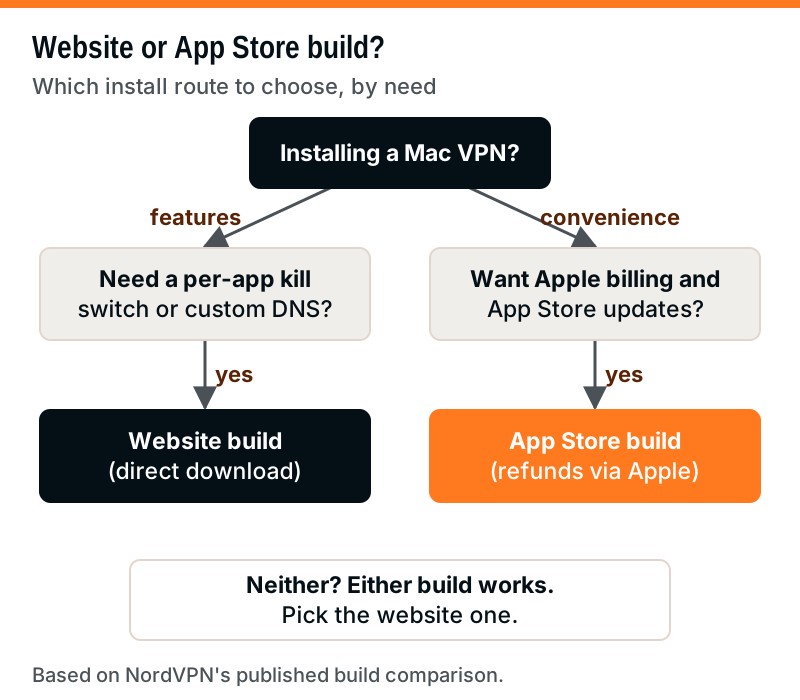
Apple requires Mac App Store apps to run inside its sandbox and use Apple's billing. A VPN sold through the store can still be excellent, but some providers trim features that need deeper system access. The direct-download build, installed from the provider's own site, updates itself and is not bound by those store rules.
NordVPN is the only provider here that publishes a line-by-line comparison of its two Mac builds, so it is the clearest example of the trade-off.
| Feature | Website build | App Store build |
|---|---|---|
| NordLynx, OpenVPN, NordWhisper | Yes | Yes |
| Post-quantum encryption | Yes | Yes |
| Per-app kill switch | Yes | No |
| VPN bypass prevention | No | Yes |
| Custom DNS | Yes | No |
| Real-time protection | Full | Limited |
| Meshnet | Full | Limited |
| Updates | Own updater | App Store |
| Refunds | NordVPN | Apple |
Read the table as a choice between two kinds of safety net. The website build's App Kill Switch cuts chosen apps off the internet if the VPN drops. The App Store build replaces it with "VPN bypass prevention", which keeps traffic inside the tunnel when the connection drops or the network changes. Neither is wrong; they suit different people. If you run a torrent client or a work app that must never touch your real IP, the per-app kill switch is the more precise tool.
The billing column matters more than it looks. If you subscribe through the App Store, NordVPN cannot refund you: you request it from Apple at reportaproblem.apple.com, and you cancel in your Apple subscriptions, not in your Nord Account. The same rule applies to any VPN bought with Apple's in-app billing.
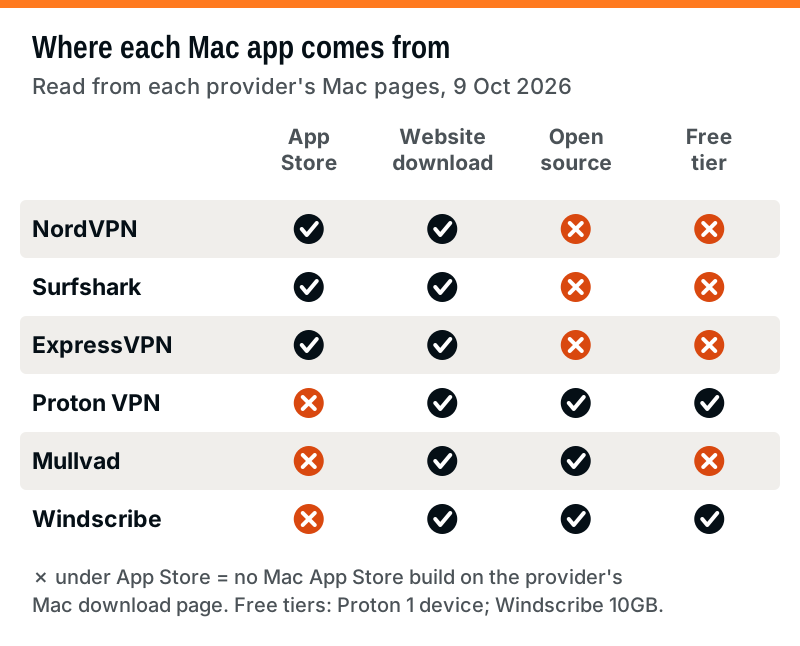
For the other providers, the picture is simpler. Surfshark and ExpressVPN offer both routes and publish no feature split between them. Proton, Mullvad and Windscribe offer only their own installers on their Mac download pages.
macOS permissions explained: network extension and system extension prompts
Every Mac VPN asks for permission at install, and the prompts are where most first-time users get stuck. There are two kinds. A VPN configuration prompt asks you to allow the app to add a VPN profile; you approve it once with your password or Touch ID. A network or system extension prompt asks you to let the app load a component that filters or routes traffic, which modern protocols and split tunnelling depend on.
Where you approve an extension depends on your macOS version, and the path is the same for most VPN apps:
- macOS 15 Sequoia and later: System Settings, then General, then Login Items & Extensions, then Network Extensions; turn the app's switches on.
- macOS 13 Ventura and 14 Sonoma: System Settings, then Privacy & Security; scroll to Security and click Allow next to the blocked software.
- macOS 12 Monterey or earlier: Security & Privacy, then General; unlock, click Details and tick the app.
A prompt can also reappear later, for example the first time you switch protocol or turn on split tunnelling, because those features can load their own components. If a VPN connects but carries no traffic, a missed extension approval is the first thing to check.
Kill switches on a Mac, provider by provider
On a laptop that sleeps, wakes and hops between Wi-Fi networks all day, no feature matters more than a kill switch. When the tunnel drops, it stops your Mac from quietly sending traffic over the open connection. On macOS the providers implement it differently, and not every one is on out of the box.
- NordVPN: the website build has the per-app App Kill Switch; the App Store build has VPN bypass prevention instead. NordVPN's kill-switch article says VPN bypass prevention works at the routing level and holds through app restarts and sleep.
- Surfshark: a Kill Switch toggle under Settings, then VPN settings, per its support pages. Turn it on after your first connection.
- Proton VPN: Proton lists the kill switch among the features available to every user, the free plan included.
- Windscribe: its firewall blocks all traffic outside the tunnel by default and, in Windscribe's words, fails closed, so non-VPN traffic is never allowed out in the first place.
- ExpressVPN and Mullvad: both offer leak protection in their Mac apps, but the Mac pages we read on 9 October 2026 did not state the default, so open the settings and confirm it is on.
Whichever app you choose, test it once: connect, switch Wi-Fi off and on, and check that pages stop loading until the VPN reconnects. That two-minute check tells you more than any feature list.
How to install a VPN on a Mac safely
The install is quick, but a few habits keep it clean.
- Download from the source. Use the provider's own site or the Mac App Store listing it links to, never a third-party download portal.
- Check the macOS floor first. NordVPN and Mullvad need macOS 14 Sonoma or later; Surfshark needs macOS 12 or later.
- Approve the prompts deliberately. Allow the VPN configuration and, on macOS 15 and later, the network extension under Login Items & Extensions. Deny anything you did not expect.
- Turn on the kill switch and, where offered, post-quantum mode before you rely on the connection.
- Set auto-renewal to off in your account, or in Apple's subscription settings if you paid through the App Store, so the renewal price is a choice.
Uninstalling cleanly matters too. Quit the app, delete it, then open System Settings, then VPN, and remove any configuration it left behind; on macOS 15 and later also check Login Items & Extensions for a leftover network extension.
iCloud Private Relay and a VPN on the same Mac
Private Relay, Apple's iCloud+ feature, is not a VPN and does not stack with one. Apple's technical overview says Private Relay covers Safari browsing, DNS lookups made by the device and unencrypted (http://) traffic from other apps, but not the encrypted traffic most apps use. It needs a paid iCloud+ subscription, it will not let you appear in another country, and it switches itself off in places where Apple does not offer it.
When a VPN is running, traffic that goes through the VPN does not use Private Relay; Apple says the VPN takes precedence. Apple's Mac support page goes further and says VPN or filtering software can conflict with Private Relay, recommending you turn off or uninstall the third-party app if you want Private Relay to work. In practice that gives you two sensible setups:
- Private Relay on, VPN off, for everyday Safari browsing where you only want to hide your IP from websites and your network provider.
- VPN on, Private Relay off for that network, when you need every app covered, a location in another country, or a kill switch.
What you should not do is assume both are protecting you at once. If a site behaves oddly with your VPN connected, check whether Private Relay is also trying to run.
Prices, dated, with renewal
Mac apps come with the same subscriptions as every other platform, so the price question is the usual one: what you pay in the first term, and what you pay after it renews. All figures below are US prices before tax, read on 9 October 2026, and they change often.
| VPN (plan) | First term | Renews at | Devices |
|---|---|---|---|
| Surfshark Starter | $2.49/mo, $67.23 for 27 mo | $79/yr | Unlimited |
| ExpressVPN Basic | $2.99/mo, $83.72 for 28 mo | $99.95/yr | 10 |
| Proton VPN Plus | $3.49/mo, $83.76 for 24 mo | $83.88/yr | 10 |
| NordVPN Basic | $3.49/mo, $94.23 for 27 mo | $139.08/yr | 10 |
| Mullvad | EUR 5/mo flat (about $5.60) | Same | 5 |
| Windscribe Pro | $69/yr or $9/mo | Same | Unlimited |
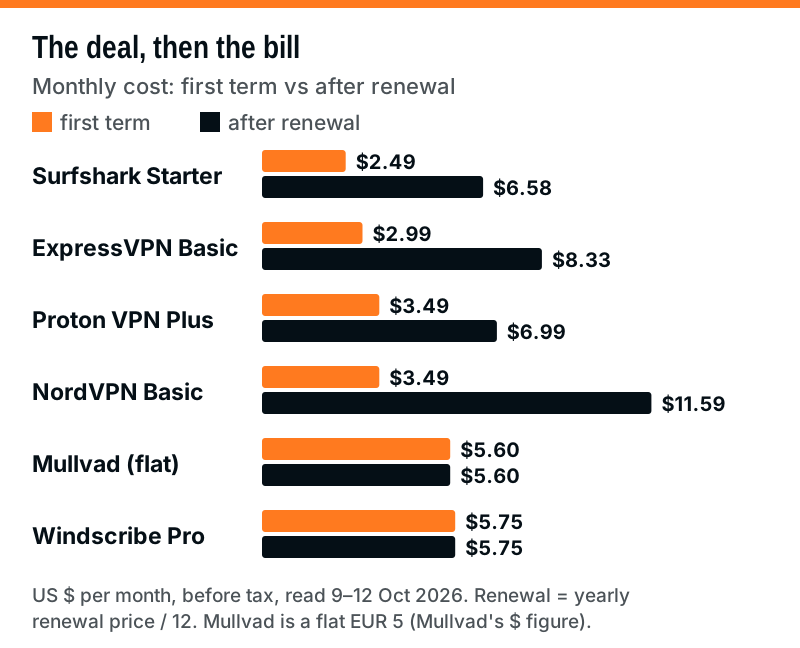
Two things are clear from the chart. The big brands start cheap and roughly double or triple at renewal: Surfshark Starter goes from $2.49 to about $6.58 a month, and NordVPN Basic renews at $139.08 a year, about $11.59 a month. Mullvad and Windscribe Pro charge the same on day one as in year three, so they look dearer at first and cheaper later.
Refund windows differ as well: 30 days for Surfshark, ExpressVPN, Proton and NordVPN first purchases; 14 days for Mullvad, excluding cash. If you buy any of them through the Mac App Store, Apple's refund rules apply instead. For a Mac-plus-family household, Surfshark's unlimited devices usually wins on cost; you can compare Surfshark's current plans on its own site (an affiliate link). For one or two Macs with privacy first, Proton VPN's plans start with the free tier.
The unpaid picks: Mullvad and Windscribe
We earn nothing from either of these, and both are strong on a Mac.
Mullvad suits anyone who wants a Mac VPN that knows as little about them as possible. Instead of an email login you get a randomly generated account number, a flat price of €5 a month, and up to five devices. Its Mac app comes as a DMG or a standalone PKG from mullvad.net and needs macOS 14 Sonoma or later. Mullvad has been WireGuard-only since it removed OpenVPN on 15 January 2026, and its quantum-resistant tunnels are on by default. Its apps are open source, and its recent third-party audits include X41 D-Sec on its account and payment services (January 2026). Our Mullvad review explains why it scores 10 on transparency.
Windscribe is worth trying if you want a free Mac VPN with a real app and several devices. Windscribe says its macOS app is a native universal binary that runs on Apple Silicon without Rosetta, its firewall blocks traffic outside the tunnel by default and fails closed, and it offers per-app split tunnelling, with protocols running from WireGuard and IKEv2 to OpenVPN plus two stealth options. Its free plan gives you 10GB each month after you verify your email, or 2GB if you skip that. Pro costs $69 a year or $9 a month, read 9 October 2026. Windscribe is based in Canada, and its outside checks are security audits rather than a Big Four-style no-logs assurance report: most recently a 2024 PacketLabs audit of its server infrastructure, which Windscribe says found no intentional subversion of its no-logs policy.
Edge cases: older Macs, work Macs and Apple Silicon
Older macOS versions. NordVPN's current Mac apps need macOS 14; its support pages list older versions for older systems (version 10.8.1 for macOS 12 to 13, 9.3.1 for macOS 11). Older app versions receive fewer fixes, so if your Mac cannot run a current macOS, weigh that before relying on one for anything sensitive. Surfshark's Mac page sets macOS 12 as its floor and Mullvad's sets macOS 14.
Work-managed Macs. If your company manages the Mac with a device-management profile, it may block new network extensions or already route traffic through its own VPN. Installing a personal VPN on top can break work tools. Ask first.
Apple Silicon. Windscribe and Surfshark state their Mac apps run natively on both Apple Silicon and Intel. The other providers did not state chip support on the Mac pages we read, so check the download page if you still use an Intel Mac.
Two VPNs at once. macOS lets you install several VPN apps, but only run one tunnel at a time. If a connection fails, quit the other VPN apps and check System Settings, then VPN, for leftover configurations.
Mac VPN questions
What is the best VPN for Mac in 2026?
Do Macs need a VPN?
Is the App Store version of a VPN worse on a Mac?
Is there a free VPN for Mac that is safe?
Does iCloud Private Relay work alongside a VPN on a Mac?
See where this lands against the field: the best VPN 2026, ranked by Gauge Score, or the best VPN for privacy.