Best Free VPN for Linux (2026): GUI, CLI and Kill Switch, Distro by Distro
The best free VPN for Linux is Proton VPN Free. It is the only free plan we found that pairs an official Linux desktop app and a command-line client with open-source code and no data cap, and its kill switch is not held back for paying customers. The catch is control: one device, a server chosen for you in one of 10 countries, and what Proton calls medium speed. If you would rather pick your own location and can live inside a monthly allowance, Windscribe Free is the alternative, and it pays us nothing.
If you are ready to pay, the best VPN for Linux overall depends on how you work. NordVPN suits people who want a full graphical app with a terminal client underneath, both open source. Mullvad suits people who want an account with no email address attached. Everything on this page was read from each provider's own Linux pages, support articles and code repositories between 9 and 12 October 2026. We ran no speed tests and quote none. For the cross-platform picture, see our best VPN ranking.
Skip this guide if you only need to reach a work network: your employer's VPN client, not a consumer service, is what connects you to it.
Quick picks for Linux users
Linux is where VPN marketing and VPN reality drift furthest apart. A provider can truthfully say it supports Linux while offering only a terminal tool, a package for two distro families, or an app whose kill switch disappears in one package format. So each pick below names the exact build you get.
Proton VPN Free: the free pick with no data allowance
Proton's free plan works in the same Linux app as its paid plans. Proton offers a GTK desktop app and a separate command-line tool, publishes the desktop app's code under the GPL-3.0 licence, and officially supports current Debian, Ubuntu, Fedora and Arch. The free plan has no data allowance to run out of, no session limit and no advertising, and both the kill switch and Proton's Stealth obfuscation protocol are included. What you give up is choice: Proton assigns the server, from a pool in 10 countries, and the plan covers one device. Streaming and P2P support are reserved for paid plans.
Install it from Proton's own repository packages rather than the Snap. Proton's Linux guide says the Snap build lacks its own protocols, Stealth and split tunnelling, and does not run on ARM. If you later want more locations and up to 10 devices, the paid Plus plan uses the same app; you can see Proton's current plans on its site (an affiliate link). Its no-logs policy has been checked on site by Securitum five years running, most recently from 20 to 27 May 2026.
Affiliate link. Check the current price on the provider’s own page — a commission never changes a Gauge Score.
Windscribe Free: pick your own country, within a monthly allowance
Windscribe's free tier allows 10GB of data a month if you verify an email address, 2GB if you skip that step, across servers in 10 countries: the US, Canada, the UK, Hong Kong, France, Germany, the Netherlands, Switzerland, Norway and Romania. Unlike Proton Free, you choose the location yourself. Its Linux desktop app is the same open-source client it ships for Windows and macOS, with native packages for Debian and Ubuntu (both amd64 and ARM64), Fedora, Arch and openSUSE, and Windscribe also publishes separate command-line packages for headless machines. It keeps no official Flatpak or Snap.
Two Linux features stand out. Windscribe's firewall uses the operating system's own interfaces to block everything outside the tunnel, which it argues is safer than a reactive kill switch, and its split tunnelling works per app or per IP address and domain. A PacketLabs audit of its server infrastructure in June 2024 found nothing that deliberately undermined its no-logs policy, by Windscribe's account. Windscribe has no affiliate programme, so we have no link to give you; the paid Pro plan costs $69 a year or $9 a month.
NordVPN: the paid pick for a full desktop app
NordVPN's Linux client now has a graphical app alongside its command-line tool, and the whole client, the background service, the GUI and the tray icon, is published on GitHub under GPL-3.0. Packages come as .deb, .rpm and Snap, covering Ubuntu from 22.04, Debian from 12, Fedora from 43, Mint from 21, plus Raspberry Pi OS. It supports NordLynx (its WireGuard-based protocol), OpenVPN and NordWhisper for restrictive networks, and post-quantum encryption is an opt-in setting, switched on with `nordvpn set pq on` or in the GUI's security settings.
Two Linux specifics are worth knowing before you buy. Its kill switch keeps the internet blocked even after you disconnect by hand, so a deliberate disconnect does not quietly expose you. And since version 4.0.0 the Linux app has paused IPv6 support, which NordVPN tied to leak risk. Our NordVPN review covers its audit record. One account covers 10 devices. Basic costs $94.23 for the first 27 months (about $3.49 a month) and then renews at $139.08 a year, before tax, as of 12 October 2026; you can check NordVPN's Linux plans (an affiliate link).
Affiliate link. Check the current price on the provider’s own page — a commission never changes a Gauge Score.
Mullvad: the paid pick with the least personal data
Mullvad asks for no email address: you get a random account number and pay a flat €5 a month, with up to 5 devices. Its Linux app ships as .deb and .rpm packages for x86_64 and ARM64, needs Ubuntu 24.04 or Debian 12 or later, or Fedora 43 or later, and includes a full command-line tool alongside the GUI. Split tunnelling works on Linux through the `mullvad-exclude` command or the app's settings. OpenVPN is gone from Mullvad entirely, client and server, as of 15 January 2026, so every connection uses WireGuard; the client code is public under GPL-3.0. It pays nobody for referrals, including us; read our Mullvad review for the details.
ExpressVPN, Surfshark, PIA and CyberGhost on Linux
All four work on Linux, with differences that matter more there than on other systems. ExpressVPN's version 5 app is a full GUI with a command-line mode, installed from a .run file on Ubuntu 24.04, Debian 12, Fedora 39, Linux Mint 22, Arch and 64-bit Raspberry Pi OS; its standard kill switch is on by default, according to its own support guide, and an advanced mode blocks traffic whenever the VPN is off. PIA's open-source GUI, controlled from the terminal with `piactl`, covers Ubuntu 20.04 and later, Mint, Debian, Fedora and Arch, with a separate ARM64 build. Surfshark's GUI comes as .deb, Snap or Flatpak, but its kill switch is missing from the Flatpak and it has no split tunnelling on Linux. CyberGhost offers a command-line app only, for Debian 12, Ubuntu 22.04, Fedora 34, AlmaLinux and Rocky Linux.
Linux client matrix: GUI, CLI, packages, kill switch, open source
Roundups disagree about which Linux apps have a GUI because several providers added one recently and older articles were never updated. The matrix below reflects what each provider's own Linux page, support guide or repository said when we read it. A dash means the provider did not claim the feature on the pages we read, not that we tested and found it missing.
| VPN | GUI | CLI | Packages | Kill switch | Split tunnelling | Open source |
|---|---|---|---|---|---|---|
| Proton VPN | Yes | Yes | Repo .deb/.rpm, Arch; Snap (reduced) | Standard + Advanced | Yes (GUI) | Yes |
| Windscribe | Yes | Separate package | .deb, .rpm, Arch, openSUSE | Firewall (Automatic, Manual, Always-on) | Apps, IPs, domains | Yes |
| NordVPN | Yes | Yes | .deb, .rpm, Snap | Yes, holds after manual disconnect | Allowlist (ports, subnets) | Yes |
| Mullvad | Yes | Yes | .deb, .rpm (x86_64, ARM64) | Always on while connected; Lockdown mode | Yes | Yes |
| ExpressVPN | Yes | Yes | .run installer | Standard + Advanced | Yes | - |
| PIA | Yes | Yes (piactl) | .run installer | Yes | Yes | Yes |
| Surfshark | Yes | Manual OpenVPN only | .deb, Snap, Flatpak | Not in Flatpak | No | No |
| CyberGhost | No | Yes | From account dashboard | - | - | - |
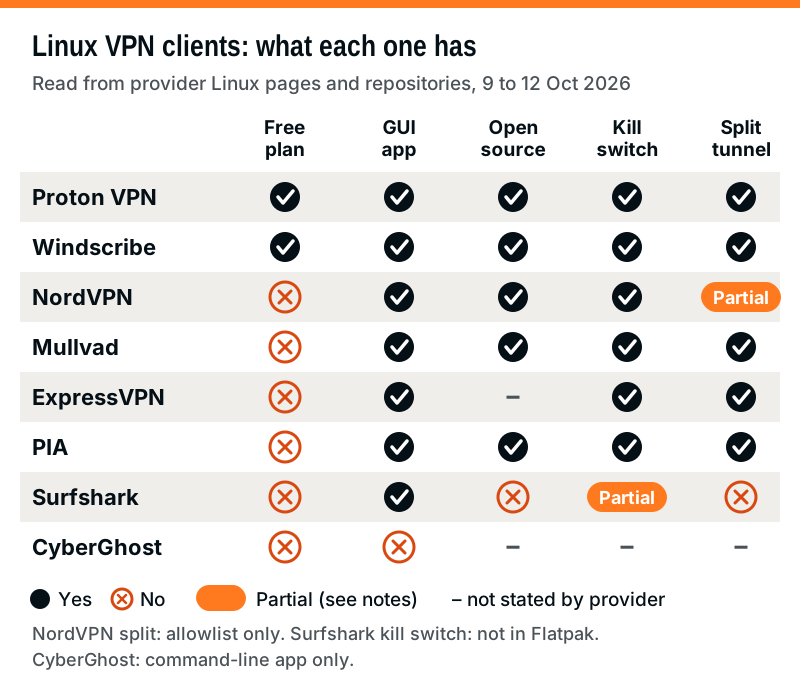
Read the open-source column as a statement about the client on your machine, which is the code that touches your network stack and firewall. It says nothing about the servers. For those, the evidence is a no-logs audit with a named firm and date: Deloitte for NordVPN (fieldwork 10 November to 12 December 2025), Securitum for Proton (May 2026) and PacketLabs for Windscribe (June 2024).
Which install path suits your distro
The package format decides more than convenience on Linux. Native packages from a provider's own repository update with the rest of your system and generally get every feature; sandboxed formats such as Snap and Flatpak can lose features that need deep network access, as the Proton and Surfshark notes above show. The flow below starts from your distro family.
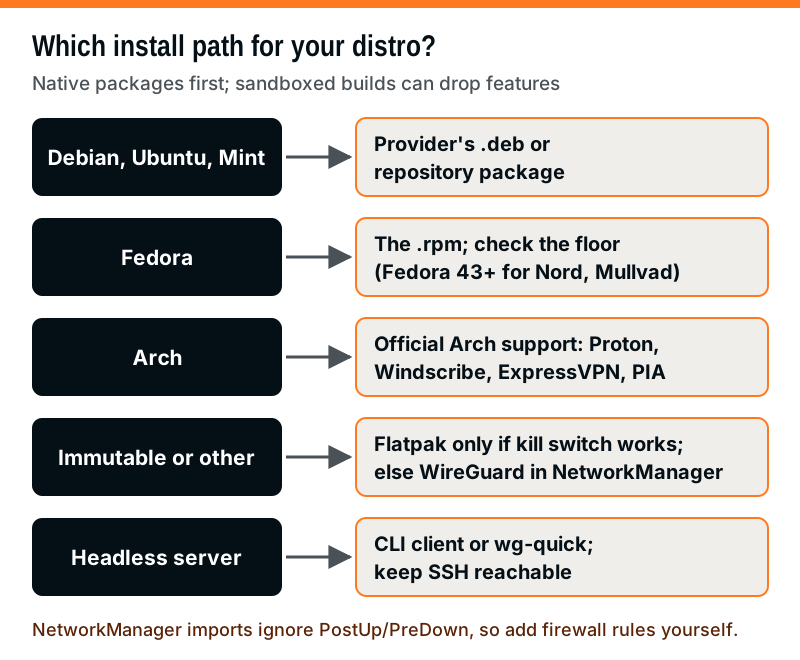
Debian, Ubuntu and Mint users have the widest choice, since every provider here ships something for them. Fedora users should check the version floor first: NordVPN and Mullvad both list Fedora 43 or later. Arch users have official support from Proton, Windscribe, ExpressVPN and PIA, while NordVPN and Mullvad do not list Arch on their download pages. On an immutable desktop, where you cannot easily install a .deb or .rpm, a Flatpak is tempting, but check what it drops first; Surfshark's, for example, has no kill switch. The fallback that works almost everywhere is a WireGuard file in NetworkManager, covered below.
WireGuard on Linux: the native option
Linux has a VPN protocol built into the kernel. WireGuard was merged into mainline Linux in version 5.6, released on 29 March 2020, alongside WireGuard 1.0.0, its first stable release. Its whitepaper puts the Linux implementation at under 4,000 lines of code, small enough to be reviewed in a way that older VPN code bases rarely are. Several providers' own protocols build on it, including NordLynx, and Mullvad now uses nothing else.
Because the kernel already speaks WireGuard, you can use a provider's servers without its app. Proton lets every account, the free one included, generate WireGuard configuration files, though free users get only one option, VPN Accelerator. Mullvad has a configuration generator in its account area, with a separate key for each device. NordVPN now offers manual WireGuard configuration downloads from the Nord Account dashboard, with a Linux guide. Each file describes one server; to change location, you download another file.
Bring one up with `wg-quick up wg0`, where wg0 is the configuration file's name without the .conf extension. The tool adds the interface, sets the addresses and routes, and if the file sends all traffic through the tunnel (AllowedIPs = 0.0.0.0/0), it uses policy routing to override your default gateway. It sets DNS through resolvconf, so check your distro handles that before you trust the result.
How Linux kill switches actually work
On Linux, a kill switch is usually a set of firewall rules, not a watchdog that reacts after a drop. The idea is simple: allow traffic that leaves through the tunnel interface, allow the encrypted packets going to the VPN server itself, and reject everything else. If the tunnel falls over, nothing matches the allow rules, so nothing leaks. That is why rule-based kill switches can protect you even in the seconds before an app notices the connection is gone.
The wg-quick manual page shows the technique in two lines. A PostUp command inserts an iptables rule that rejects any outbound packet that is not leaving through the WireGuard interface and is not carrying WireGuard's own firewall mark, and a matching PreDown command removes it. The manual adds two caveats: most DHCP traffic still gets through, because DHCP clients bypass the netfilter firewall, and if you use IPv6 you need equivalent ip6tables rules.
Provider apps differ in when the block applies, and that difference matters more than the mechanism:
- Only when the tunnel drops unexpectedly: Proton's Standard kill switch and ExpressVPN's standard mode. A deliberate disconnect gives you a normal connection again. Surfshark's support page says its kill switch blocks the internet when the VPN drops, until you reconnect, but does not say what happens when you disconnect on purpose.
- Whenever the VPN is not connected: Proton's Advanced kill switch in its Linux GUI and ExpressVPN's advanced mode. Nothing reaches the internet unless the VPN is up, which survives restarts but will also block you on captive-portal Wi-Fi until you switch it off.
- Even after a manual disconnect: NordVPN's Linux kill switch keeps blocking until you turn the feature off, according to its kill-switch article.
- A firewall with modes you pick: Windscribe's firewall, which uses the operating system's own APIs to block connectivity outside the tunnel. In Automatic mode it switches on when you connect, off when you disconnect, and still blocks if the app crashes or the tunnel drops; Always-on mode blocks everything except the VPN, even after a restart.
Whichever you use, test it once. Connect, then bring the tunnel down from outside the app, for example with `sudo ip link set wg0 down` or by stopping the VPN service, and check that pages stop loading. If they keep loading, your kill switch is not doing what you think.
Using NetworkManager or wg-quick without the provider app
NetworkManager has handled WireGuard natively since version 1.16, released in March 2019, and most desktop distros use it. You can import a provider's file with `nmcli connection import type wireguard file wg0.conf`, after which the tunnel appears in your desktop's network menu like any other connection. Unlike wg-quick, which configures the tunnel and exits, NetworkManager stores a profile you can activate again and again, and the imported profile is set to connect automatically.
There is one trap that catches people. NetworkManager's import ignores the PreUp, PostUp, PreDown and PostDown lines, so the iptables kill-switch rules from the example above do not come across. You get the tunnel but not the protection. If you go the NetworkManager route, add firewall rules separately, or accept that a dropped tunnel falls back to your normal connection.
Manual setups also skip the extras providers build into their apps: automatic server choice, obfuscation for restrictive networks, and leak protection tuned to their own infrastructure. For a server or a router-like box, wg-quick is often all you need. For a laptop that moves between networks, the provider's app usually does more for you.
Prices and device limits, dated
Linux users pay the same as everyone else; no provider here charges extra for the Linux app. As always, look at the year-two price as well as the first term. The figures below are US list prices without tax, as we found them between 9 and 12 October 2026; expect them to move.
| VPN (plan) | First term | Renews at | Devices |
|---|---|---|---|
| Proton VPN Free | $0 | $0 | 1 |
| Windscribe Free | $0 (10GB/month with email) | $0 | No number stated |
| CyberGhost (2 years) | $56.94 for 26 months ($2.19 a month) | $56.94 a year | 7 |
| Windscribe Pro | $69 a year, or $9 monthly | $69 a year | No number stated |
| Mullvad | €5 a month at any length (about $5.60) | €5 a month | 5 |
| Surfshark Starter | $67.23 for 27 months ($2.49 a month) | $79 a year | Unlimited |
| Proton VPN Plus | $83.76 for 24 months ($3.49 a month) | $83.88 a year | 10 |
| ExpressVPN Basic | $83.72 for 28 months ($2.99 a month) | $99.95 a year | 10 |
| NordVPN Basic | $94.23 for 27 months ($3.49 a month) | $139.08 a year | 10 |
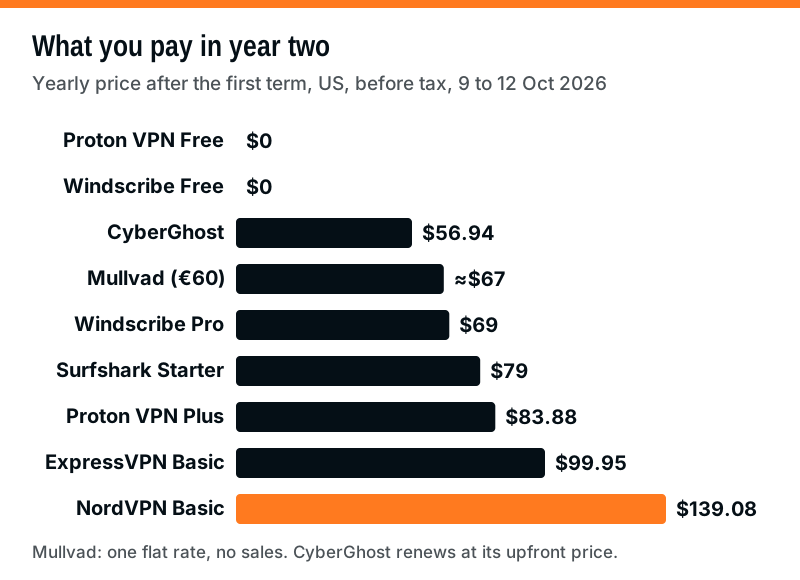
The ranking changes once introductory deals end. CyberGhost's two-year plan renews at $56.94 a year, the same sum it charged upfront for 26 months; Mullvad charges one flat rate and runs no sales; Windscribe Pro bills $69 every 12 months; and NordVPN Basic is the dearest at renewal. Refund windows also vary: 30 days for NordVPN, ExpressVPN, Surfshark and Proton first purchases, 45 days for CyberGhost's longer plans, and 14 days for Mullvad, cash excluded. NordVPN also runs a 7-day free trial on its 1-year and 2-year plans in some countries, the US among them, but you must enter a card or PayPal account first, and billing starts automatically if you do not cancel in time.
Free VPNs on Linux: what to avoid
Beyond Proton and Windscribe, free Linux options thin out quickly, and the gaps are where the risk lies. Some free services are browser extensions that only cover browser traffic; Opera's built-in VPN, for example, protects only the Opera browser. Others come from companies that will not say who runs them or how the servers are paid for. The documented history of Hola, which from late 2014 sold its users' connections as exit nodes through a business called Luminati, now Bright Data, shows why that question matters.
A sensible test for any free Linux VPN: is the client's source code public, is the operator a company you can name and locate, and has a named firm audited it on a known date? Proton and Windscribe pass all three. If a free option fails any of them, a self-hosted WireGuard server on a machine you control is a safer route, though that hides your traffic from the local network only, not from websites.
Edge cases: ARM boards, Chromebooks and servers
Raspberry Pi and other ARM boards. NordVPN lists Raspberry Pi OS, ExpressVPN supports 64-bit Raspberry Pi OS Bookworm and later, Mullvad and Windscribe ship ARM64 packages, and PIA has a separate ARM64 download. Proton's Snap does not run on ARM, so use its native packages there.
Chromebooks with Linux turned on. The Linux container on a Chromebook shares the Chromebook's network. Proton says its Android app, installed from the Play Store, secures ChromeOS, Android apps and Linux apps alike, which is usually simpler than running a second VPN inside the container.
Headless servers. Use a provider's command-line client (NordVPN, Mullvad, ExpressVPN, PIA, CyberGhost, or Windscribe's separate CLI package) or plain wg-quick. Before you connect a remote machine, make sure you will not lock yourself out of SSH: a full tunnel or a strict kill switch can cut the very session you are typing in.
IPv6. Proton tunnels IPv6 by default on Linux where its servers support it, while NordVPN's Linux app has paused IPv6 support. If your network gives you IPv6 and your VPN does not carry it, check for leaks after connecting.
China. NordVPN's help centre says its apps are fully blocked in China, Linux included. If you are travelling there, read the local rules and the provider's own guidance before relying on any VPN.
Linux VPN questions
What is the best free VPN for Linux?
What is the best VPN for Linux if I am willing to pay?
Does NordVPN have a GUI on Linux?
Can I use a VPN on Linux without installing the provider's app?
Is a Linux VPN kill switch on by default?
See where this lands against the field: the best VPN 2026, ranked by Gauge Score, or the best VPN for privacy.